Blueprint-Driven Development
Experience task-driven development where your AI-generated blueprint guides every aspect of your coding workflow.
Task-Driven Development Workflow
Complete Blueprint Development Flow
The Blueprint-driven AI development process follows a systematic 7-step workflow that ensures consistent, AI-assisted development with full developer control.
Blueprint-Guided Development
Transform your development process using your AI-generated blueprint as a comprehensive roadmap for building your application.
Feature-Based Development Approach
Select Blueprint Features: Select any feature from your blueprint to begin focused development with full AI context awareness.
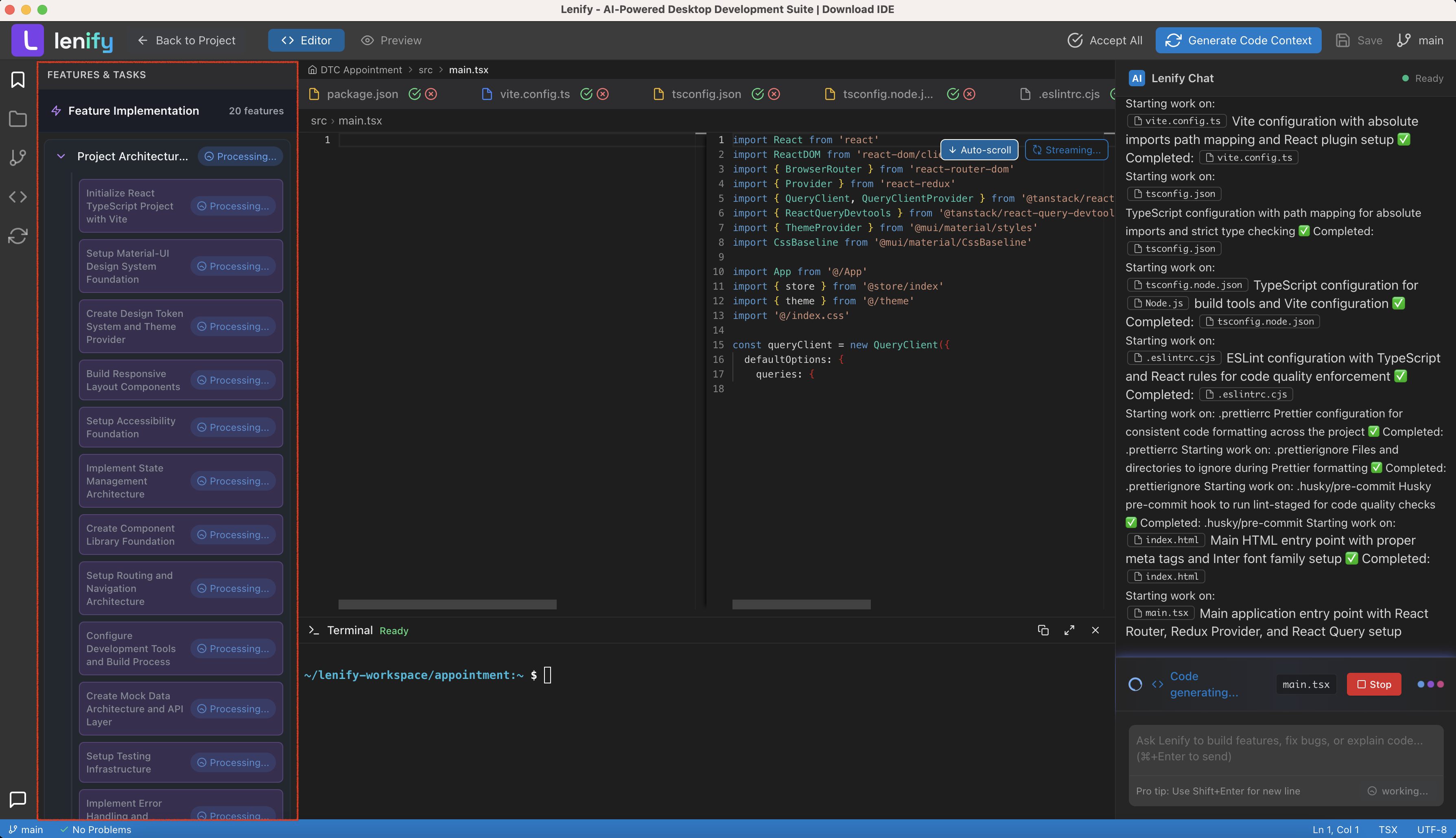 AI understands your blueprint context and generates complete implementation flows based on your selected features
Development Process:
- Select Target Task: Click on a task card from the Blueprint Features & Tasks panel
- AI Analysis: AI automatically analyzes project structure and identifies relevant files
- Code Generation: Real-time streaming code generation with live diff views in Monaco Editor
- Generation Complete: All proposed changes finalized with interactive Accept/Reject options
- Manual Review: Developer reviews AI-generated code with individual file controls
- Accept Changes: Batch acceptance of all pending changes via header button
- Save Files: Persist all accepted modifications to filesystem with automatic context generation
Detailed Workflow Steps
Automated Bug Detection & Fixing
Lenify continuously monitors your development process and automatically detects issues with intelligent resolution suggestions.
Real-Time Error Detection
Continuous Monitoring:
- Code Analysis: Real-time static analysis of your codebase for potential issues
- Runtime Error Detection: Automatic detection of runtime errors and exceptions
- Performance Issues: Identification of performance bottlenecks and optimization opportunities
- Security Vulnerabilities: Detection of common security issues and vulnerabilities
AI-Powered Resolution:
- Automatic Fix Suggestions: AI generates specific fixes for detected issues
- One-Click Fixes: Apply suggested fixes with single-click implementation
- Explanation Provided: Detailed explanations of what caused the issue and how the fix resolves it
- Learning Integration: AI learns from your coding patterns to provide more accurate suggestions
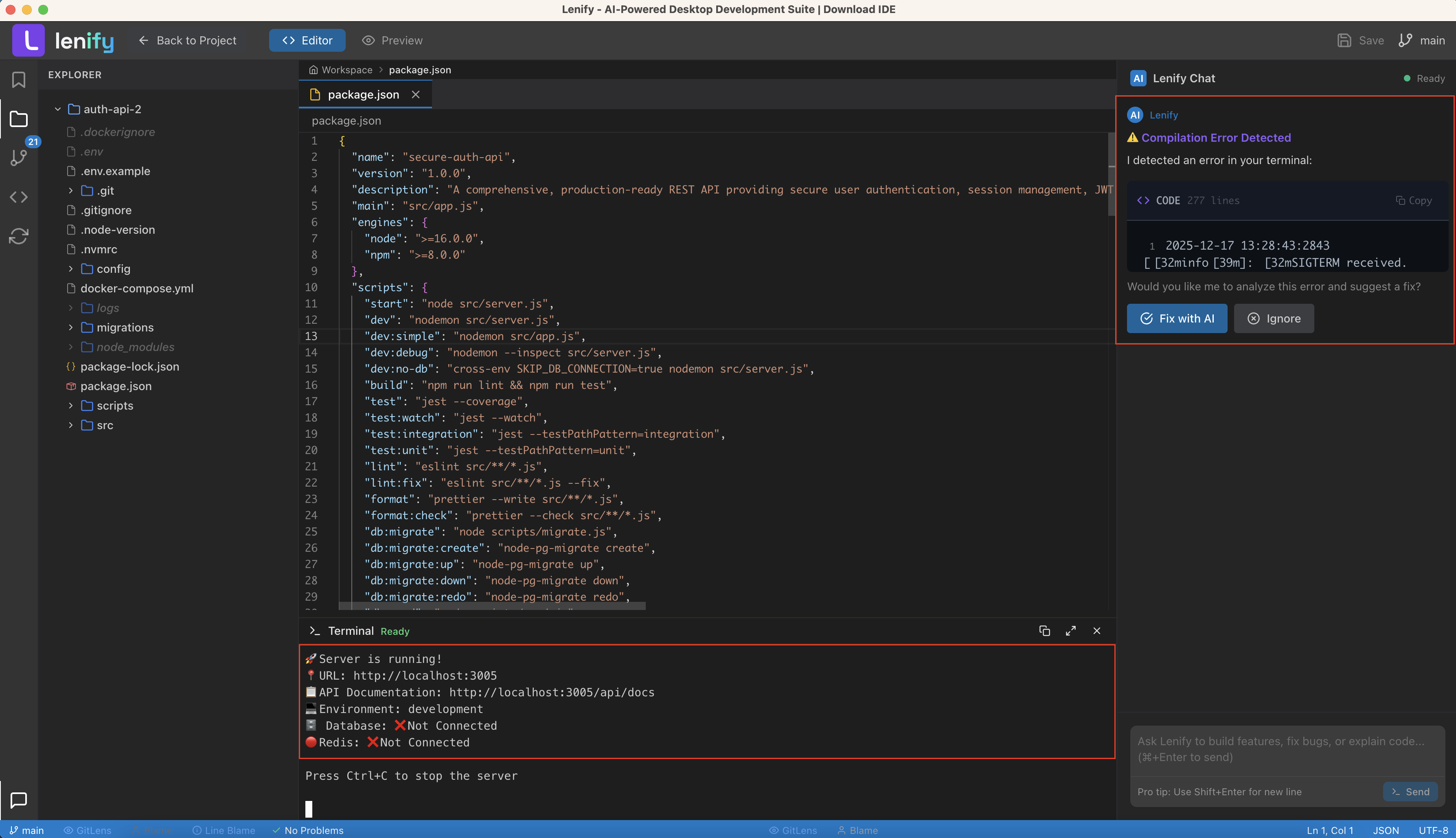 AI automatically detects potential issues in real-time and offers intelligent suggestions with auto-fix capabilities
Chat-Driven Development with AI Assistant
Leverage Lenify's powerful conversational AI interface for natural language development assistance.
Conversational Development Interface
Natural Language Coding:
- Feature Requests: Describe features in plain English and get complete implementations
- Code Explanations: Ask AI to explain complex code sections or algorithms
- Debugging Assistance: Describe problems and receive targeted debugging help
- Optimization Guidance: Request performance improvements and best practice suggestions
Real-Time Code Generation:
- Streaming Responses: Watch code being generated live with proper syntax highlighting
- Context Awareness: AI understands your entire project structure and blueprint context
- Multiple Options: Receive multiple implementation approaches for comparison
- Direct Integration: Generated code can be directly inserted into your project files
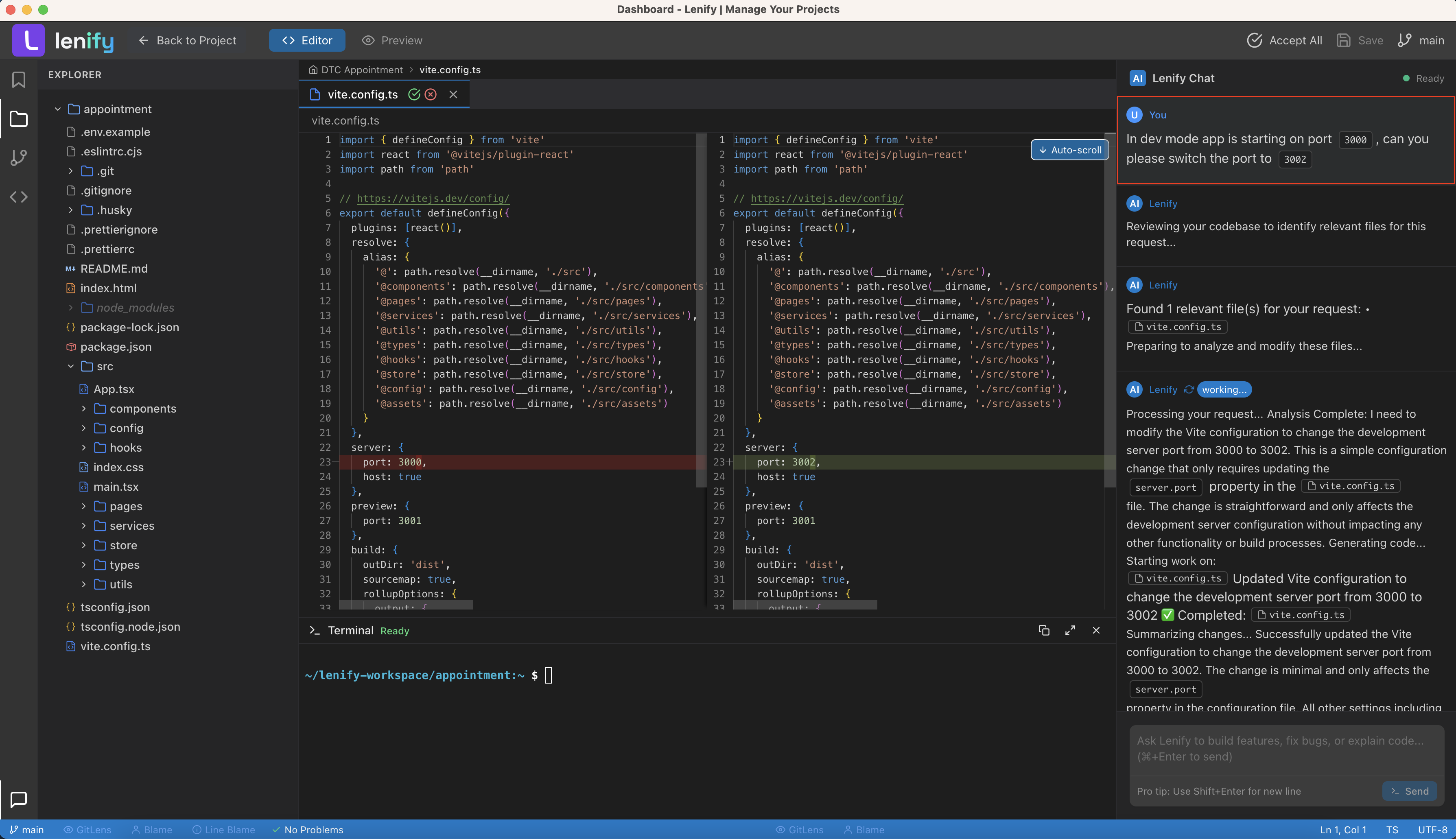 Powerful chat interface with real-time code generation, syntax highlighting, and context-aware assistance
Advanced Chat Features
Interactive Development:
- Stop Generation: Cancel long-running code generation processes when needed
- Copy & Insert: One-click copying and direct insertion of generated code
- Message History: Complete conversation persistence for reference and learning
- Context Switching: AI maintains context across different features and files
- Follow-up Questions: Ask clarifying questions to refine generated solutions
Code Context Analysis and Generation
Intelligent Codebase Understanding
Lenify's AI analyzes your entire codebase to understand relationships, dependencies, and architectural patterns.
Automatic Context Analysis
Comprehensive Code Analysis:
- Dependency Mapping: Understand how different parts of your code depend on each other
- Component Relationships: Visualize how components, functions, and classes interact
- Usage Patterns: Track where and how different code elements are used throughout your project
- Architecture Understanding: AI develops deep understanding of your project's architecture and patterns
Context Generation Process: When files lack context coverage, the system provides seamless context generation:
- Missing Context Detection: UI automatically detects files that need context analysis
- One-Click Generation: "Generate Code Context" button appears in the header toolbar
- Real-Time Progress: Progress updates displayed in the AI Assistant chat interface
- Batch Processing: Files processed efficiently in batches for optimal performance
- Completion Notification: Chat confirms completion with detailed coverage statistics
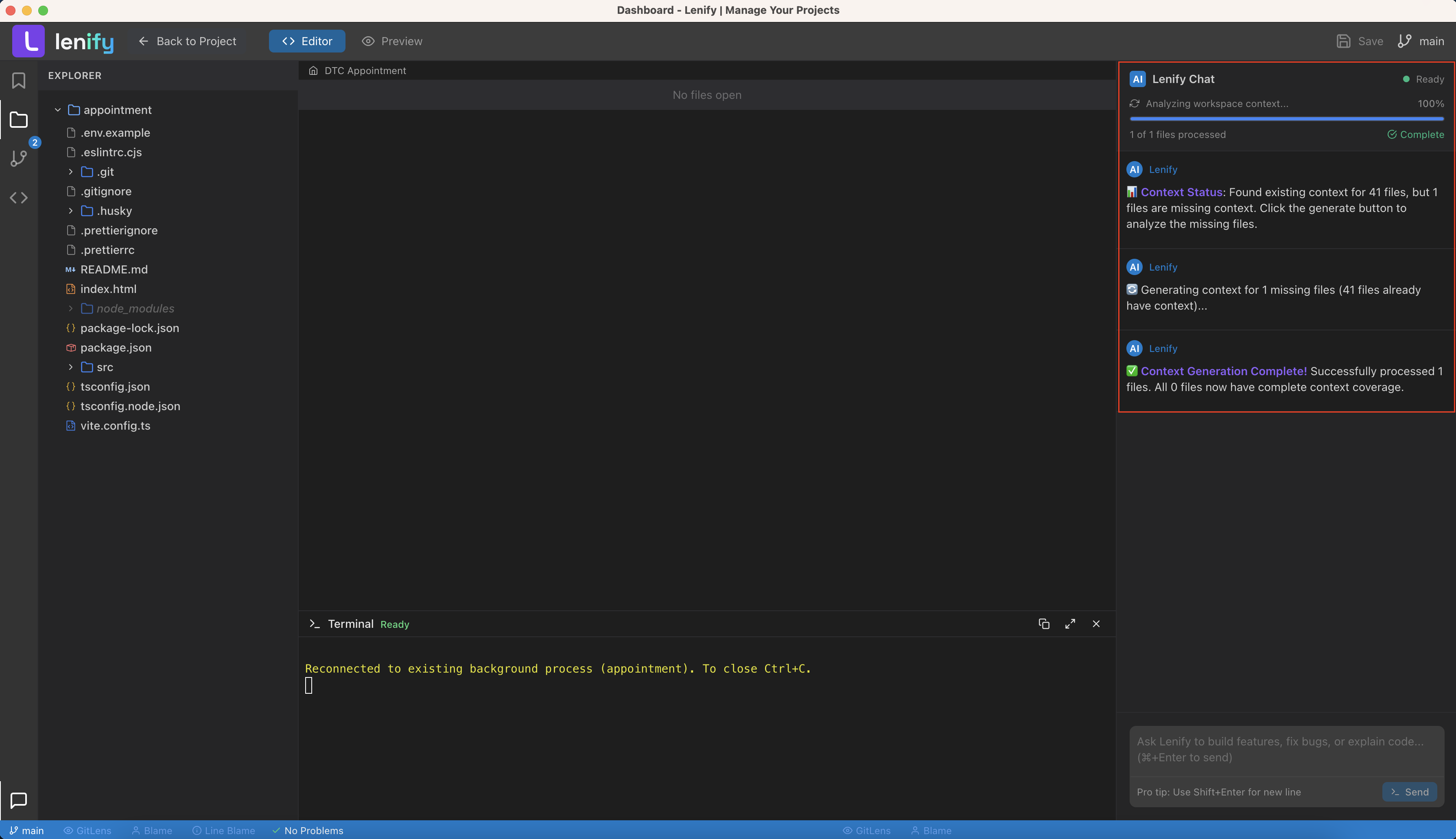 AI-powered analysis of your codebase relationships, dependencies, and suggested updates when making changes
Context-Aware Development
Intelligent Suggestions:
- Related Files: AI suggests related files when working on specific features
- Impact Analysis: Understand how changes will affect other parts of your codebase
- Refactoring Opportunities: Identify opportunities for code improvement and optimization
- Consistency Maintenance: Ensure new code follows established patterns and conventions
Blueprint Integration with Development
Seamless Blueprint Synchronization
Real-Time Sync:
- Task Progress: Development progress automatically updates blueprint task status
- Feature Completion: Completed features marked automatically in blueprint
- Timeline Updates: Actual development time updates blueprint estimates
- Architecture Alignment: Generated code aligns with blueprint architecture decisions
Guided Implementation:
- Feature Specifications: Access complete feature requirements while coding
- Task Breakdown: Follow granular task lists for systematic development
- Dependency Awareness: Understand feature dependencies during implementation
- Quality Gates: Built-in quality checks based on blueprint specifications
Advanced Development Features
Blueprint-Driven Code Generation
Architectural Consistency:
- Pattern Following: Generated code follows architectural patterns defined in blueprint
- Naming Conventions: Consistent naming based on blueprint conventions
- Structure Alignment: Code structure matches blueprint organization
- Integration Points: Proper integration with existing codebase and architecture
Feature-Specific Generation:
- User Stories: Generate code that implements specific user stories from blueprint
- API Specifications: Generate API endpoints based on blueprint API definitions
- Database Integration: Create database models and queries matching blueprint schema
- UI Components: Generate user interface components based on blueprint wireframes
Quality Assurance Integration
Automated Quality Checks:
- Code Standards: Automatic verification against coding standards and best practices
- Blueprint Compliance: Ensure code matches blueprint specifications and requirements
- Testing Integration: Generate appropriate tests based on blueprint feature definitions
- Documentation Sync: Keep code documentation synchronized with blueprint documentation
Continuous Improvement:
- Performance Monitoring: Track development performance against blueprint estimates
- Quality Metrics: Monitor code quality metrics and improvement opportunities
- Learning Integration: AI learns from your development patterns for better suggestions
- Feedback Loop: Development insights improve future blueprint generation
Development Workflow Optimization
Efficient Development Process
Streamlined Workflow:
- Blueprint Review: Start by reviewing relevant blueprint sections
- Feature Selection: Choose specific features or tasks to implement
- Context Loading: AI loads relevant project context automatically
- Implementation: Develop with AI assistance and blueprint guidance
- Progress Update: Automatic progress tracking and blueprint synchronization
Productivity Features:
- Quick Navigation: Jump between blueprint, code, and documentation seamlessly
- Smart Suggestions: AI provides contextual suggestions based on current task
- Error Prevention: Proactive identification of potential issues before they occur
- Automation: Automate repetitive tasks and boilerplate code generation
Team Collaboration
Collaborative Development:
- Shared Context: Team members share the same blueprint context and understanding
- Progress Visibility: Real-time visibility into team development progress
- Consistent Approach: Blueprint ensures consistent development approach across team
- Knowledge Sharing: AI assistant knowledge is shared across team members
Communication Enhancement:
- Feature Discussions: Discuss features within the context of blueprint specifications
- Progress Reports: Automatic progress reports based on blueprint completion
- Change Management: Manage changes to blueprint and communicate impact to team
- Code Reviews: Blueprint context enhances code review process and quality
Continue to AI Assistance to explore advanced AI development features, or check out Source Control for version control integration.